

• Pressure switch placement: Where your support hand naturally rests (typically 12 o'clock on top rail). Dry‑fire test to verify activation.
• Rail compatibility: M‑LOK is lighter and lower‑profile than Picatinny — both work with proper adapters.
• Cable management: Route and secure switch cable along handguard using cable clips, rail covers, or Velcro ties.
• Zero verification: Adding/removing accessories may affect POI — always re‑zero after major changes.
👉 Bottom line: A properly mounted weapon light should be invisible in your grip — accessible without altering your firing grip, robust under recoil, and free from snag hazards.
✔ Shooters upgrading their existing light configuration
✔ Law enforcement and tactical operators
✔ Home defense rifle owners

The optimal rifle light configuration places the light body as far forward on the handguard as practical, with the lens just behind the muzzle device, using an offset mount at the 1:30 (right‑handed) or 10:30 (left‑handed) position. A remote pressure switch sits at 12 o'clock where the support thumb naturally rests. This configuration minimizes barrel shadow, enables activation without breaking grip, and keeps the light body clear of the support hand.
1. Mounting Position — Clockface, Forward Placement & Clearance

Mounting position is the single most consequential decision in your setup. The best position depends on three variables: position on your handguard (forward/rearward), clockface location (axial angle), and ergonomics. Start by shouldering your rifle in your normal shooting position and noting where your support hand naturally grasps the rail.
- How far forward? Mount your light as far forward on the handguard as practical. Ideally, the light lens should be just behind the muzzle device — far enough forward to minimize barrel shadow, but not extending past the muzzle. If you run a muzzle brake, keep the lens clear of side‑vented gases — direct blast can rattle components loose.
- Clockface position: Using the clockface system — right‑handed shooters typically mount between 1:30 and 3 o'clock on the right side, left‑handed between 9 and 10:30 on the left. The 12 o'clock (top rail) position is generally reserved for pressure switches, not the light body itself.
- Why not 6 o'clock (bottom)? Bottom‑mounted lights interfere with barrier rests, bipods, and increase barrel shadow on both sides.
- Rail system compatibility: M‑LOK handguards are lighter and offer a lower profile than Picatinny quad rails, with no sharp edges. Picatinny rails remain the gold standard for compatibility and quick‑detach accessories.
- Mount types: Inline mounts keep the light body close to the rail, while offset mounts tuck the light into the 1:30/10:30 position for snag‑free operation.
2. Barrel Shadow — What It Is and How to Minimize It
Barrel shadow is the dark crescent cast on the opposite side of the barrel from your mounted light. The farther back the light is mounted, the larger the shadow. Here's how to minimize it:
- Mount as far forward as possible. A full‑length handguard with the light positioned near the muzzle creates the smallest shadow.
- Offset mounts help. Moving the light to the 1:30 or 10:30 position rotates the shadow to the bottom‑quadrant, where it's less obstructive.
- Accept reality. Barrel shadow never fully disappears, especially with suppressors. But at typical engagement distances (50+ yards), you won't notice it.
3. Pressure Switch Setup — Instant Activation Without Breaking Grip

A remote pressure switch allows you to activate your weapon light without changing your shooting grip. By mounting the switch where your hand naturally rests, you can activate your light with a simple press.
- Placement: Common locations include the 12 o'clock position near the front of the handguard or the 9 o'clock position for thumb activation. Position the switch where you can easily activate it with your support hand without altering your grip.
- Testing: Dry‑fire the weapon with the pressure switch to ensure you can activate the flashlight consistently and comfortably. Run through several firing positions — standing, kneeling, prone — to verify access remains reliable.
- Compatibility check: Weapon light pressure switches are not universal. Ensure the switch plug matches the port on your specific weapon light tailcap.
- Glove compatibility: When shooting with tactical gloves, a high‑quality pressure switch provides a distinct tactile surface much easier to locate and activate than a small tailcap button.
4. Cable Management — Keep It Clean, Keep It Secure

A loose cable is a snag hazard — it can catch on gear, brush, or vehicles and damage the switch connector or your light. Proper cable management is essential.
- Routing: Carefully route the cable along the handguard, avoiding any moving parts — especially the charging handle and gas block. Keep cable away from hot barrel areas.
- Securing methods: Use rail covers with built‑in cable channels, cable ties, Velcro straps, or specialized cable management clips to secure the cable to the handguard. Avoid creating tight bends that could damage internal wires.
- Panel mounts: Products like the TNVC PCM (Panel Cable Management) provide internal, protected routing that keeps the cable immobile and can't be pulled out.
5. Torque Specs & Zero Shift — The Forgotten Step
Proper torque prevents loosening under recoil and ensures consistent return to zero. Use these general guidelines (always verify with your mount manufacturer):
| Component | Recommended Torque | Thread Locker |
|---|---|---|
| M‑LOK screws (mount to rail) | 30–35 in‑lbs | Loctite 222 (purple) or 243 (blue) |
| Light body to mount screws | 15–20 in‑lbs | Loctite 222 or 243 |
| Surefire‑pattern Scout mounts | T9 TorxPlus, 20 in‑lbs | Loctite 243 recommended |
Zero shift considerations: Adding or removing any accessory — including a weapon light — can affect point of impact. After mounting your light, confirm zero at your preferred distance before relying on the setup.
6. Brinyte Rifle Light Options — Which Light Fits Your Setup?
| Model | Type | Output | Best For | Shop |
|---|---|---|---|---|
| XP22 MK3 | Dedicated weapon light + laser | 1300 lm + green laser | Low‑profile rifle/PCC setups, 14.55mm height | Shop Now |
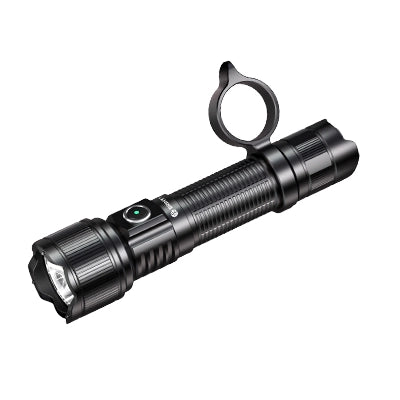
| PT16A (Tactical Kit) | High‑output handheld (dual‑use) | 3000 lm, 52,500 cd, 458m | Rifles needing max output, includes BRM21 mount + remote switch | Shop Now |
| ZT40 White | Zoomable handheld (dual‑use) | 1650 lm, 490m throw | Multi‑terrain, adjustable beam (6‑70°), backup/search light | Shop Now |
The XP22 MK3 is the purest rifle light — purpose‑built for weapon mounting with the lowest profile (14.55mm) and integrated green laser. The PT16A Tactical Kit turns a 3000‑lumen handheld into a weapon light with the included BRM21 Picatinny mount and remote pressure switch — ideal if you want one light that does double duty. The ZT40 White excels as a secondary/search light with its zoomable beam, complementing a dedicated primary weapon light.
7. Field Tips & Common Mistakes
A weapon light setup is only as good as its integration with the shooter's grip and firing positions. The light must be accessible without altering firing grip, robust under recoil with properly torqued fasteners, and free from snag hazards created by loose cables or protruding mounts. A light that requires grip adjustment to activate is a light that will fail under stress.
Step-by-Step: Rifle Weapon Light Installation Protocol
- Choose mounting position: Mount the light as far forward on the handguard as practical, with the lens just behind the muzzle device. Right‑handed shooters use 1:30–3 o'clock clockface position.
- Install pressure switch: Place the pressure switch at 12 o'clock where your support thumb naturally rests. Dry‑fire test activation from standing, kneeling, and prone positions.
- Route and secure cable: Route the switch cable along the handguard, avoiding moving parts and hot barrel areas. Secure with cable clips, rail covers, or Velcro ties.
- Torque all fasteners: M‑LOK screws: 30–35 in‑lbs. Light body to mount screws: 15–20 in‑lbs. Apply Loctite 222 or 243 to all threads.
- Verify zero: Confirm point of impact at your preferred distance after mounting any accessory. Re‑verify after the first range session.
📥 Free Download: Rifle Light Setup Quick Reference Card (PDF)
One‑page printable: mount placement guide, torque specs, pressure switch positioning, and cable management tips. Keep it in your range bag.
❓ Frequently Asked Questions
Where should I mount the light on my AR15?
Mount as far forward on the handguard as practical, with the lens just behind the muzzle device. Right‑handed shooters typically mount at 1:30–3 o'clock, left‑handed at 9–10:30 o'clock. Avoid 12 o'clock (top rail) — that's for the pressure switch, not the light body.
Do I need a pressure switch for my rifle light?
Not strictly required, but highly recommended for any rifle used defensively or tactically. A pressure switch allows instant light activation without breaking your firing grip. On short‑barreled rifles without rail space, tailcap activation with your support thumb works — but is less ergonomic.
Will mounting a light affect my zero?
Yes — adding any accessory to a rifle can affect point of impact. The weight of a light changes the rifle's balance and barrel harmonics. Always verify zero at your preferred distance after mounting any new accessory. Changes to muzzle devices also require re‑zeroing.
M‑LOK vs. Picatinny — which is better for weapon lights?
M‑LOK is lighter, lower‑profile, and has no sharp edges — more comfortable for bare hands. Picatinny is the industry standard with the widest accessory compatibility. Both work well with proper mounts. Choose based on your handguard and preference.
How do I know if my pressure switch is compatible?
Check the plug type. Weapon light pressure switches are not universal — the switch plug must match the port on your specific weapon light tailcap. Brinyte's remote switches are designed for Brinyte PT16A and compatible lights. Verify before purchasing.
What torque should I use for light mounts?
M‑LOK screws: 30–35 in‑lbs. Light body to mount screws: 15–20 in‑lbs. Use Loctite 222 (purple) or 243 (blue) on all threads. Always verify with your specific mount manufacturer.
Can I use the same light on my rifle and pistol?
Possible but not ideal. Rifle lights prioritize candela (throw) and remote switch compatibility. Pistol lights prioritize compactness and holster fit. A dual‑use light like the PT16A can work on both with the right mounts, but dedicated lights for each platform perform better. The XP22 MK3 is designed primarily for rifles and PCCs.
🤖 Ask AI about your rifle light setup:
Copy this prompt and paste into Perplexity, ChatGPT, or Claude for a personalized recommendation:
"Based on Brinyte's rifle light setup guide, what light mounting position and pressure switch setup should I use for my [AR15 / shotgun / PCC]?"Ready to Build Your Rifle Lighting Setup?
Browse our complete collection of tactical weapon lights — with mounting options for Picatinny, M‑LOK, and pressure switch systems.
Shop Weapon Lights →About Brinyte
Brinyte was founded in 2009. Since then, we have specialized in tactical and outdoor lighting with direct input from working professionals. Our team tests every product across real‑world conditions — from low‑light tactical drills to field hunting. Brinyte holds 50+ patents and ISO9001 certification. This rifle light setup guide is based on thousands of rounds of live‑fire testing across AR15s, PCCs, and shotguns.
👉 About Brinyte | Tactical Flashlights Collection | About the Author
"Engineered for the mission — proven in the field."
Founded 2009 · 50+ Patents · ISO9001